---
title: What is the Unyte State Check?
description: The Unyte State Check is a feature in the Unyte Health app designed to provide you with a clearer, more immediate view of your clients' autonomic state after each SSP or RRP session. This quick check-
---
[Skip to content](https://support.unyte.com/what-is-the-unyte-state-check#main-content)
English
Show submenu for translations
[Contact us](https://support.unyte.com/kb-tickets/new?hsLang=en)
![unyte-teal.png\]](https://support.unyte.com/hs-fs/hubfs/unyte-teal.png?width=100&height=100&name=unyte-teal.png)
Open main navigation
Close main navigation
- English
Show submenu for translations
- [Contact us](https://support.unyte.com/kb-tickets/new)
- [Go to MyUnyte](https://my.unyte.com/sign-in)
[Go to MyUnyte](https://my.unyte.com/sign-in)
Hello. How can we help you?
- There are no suggestions because the search field is empty.
1. [Help Center](https://support.unyte.com/?hsLang=en)
2. [Our Products](https://support.unyte.com/our-products?hsLang=en)
3. [Safe and Sound Protocol](https://support.unyte.com/our-products?hsLang=en#safe-and-sound-protocol)
# What is the Unyte State Check?
The **Unyte State Check** is a feature in the Unyte Health app designed to provide you with a clearer, more immediate view of your clients' autonomic state after each SSP or RRP session. This quick check-in helps clients reflect on their feelings in the moment, while providing you with a richer view of their emotional and physiological responses throughout their entire listening journey.
---
### **How It Works**
After each listening session, clients are prompted to check in with their current state, choosing from the following options:
- **Open and Engaged**
- **Playful**
- **Alert or Anxious**
- **Stuck, Shutdown**
- **Peaceful**
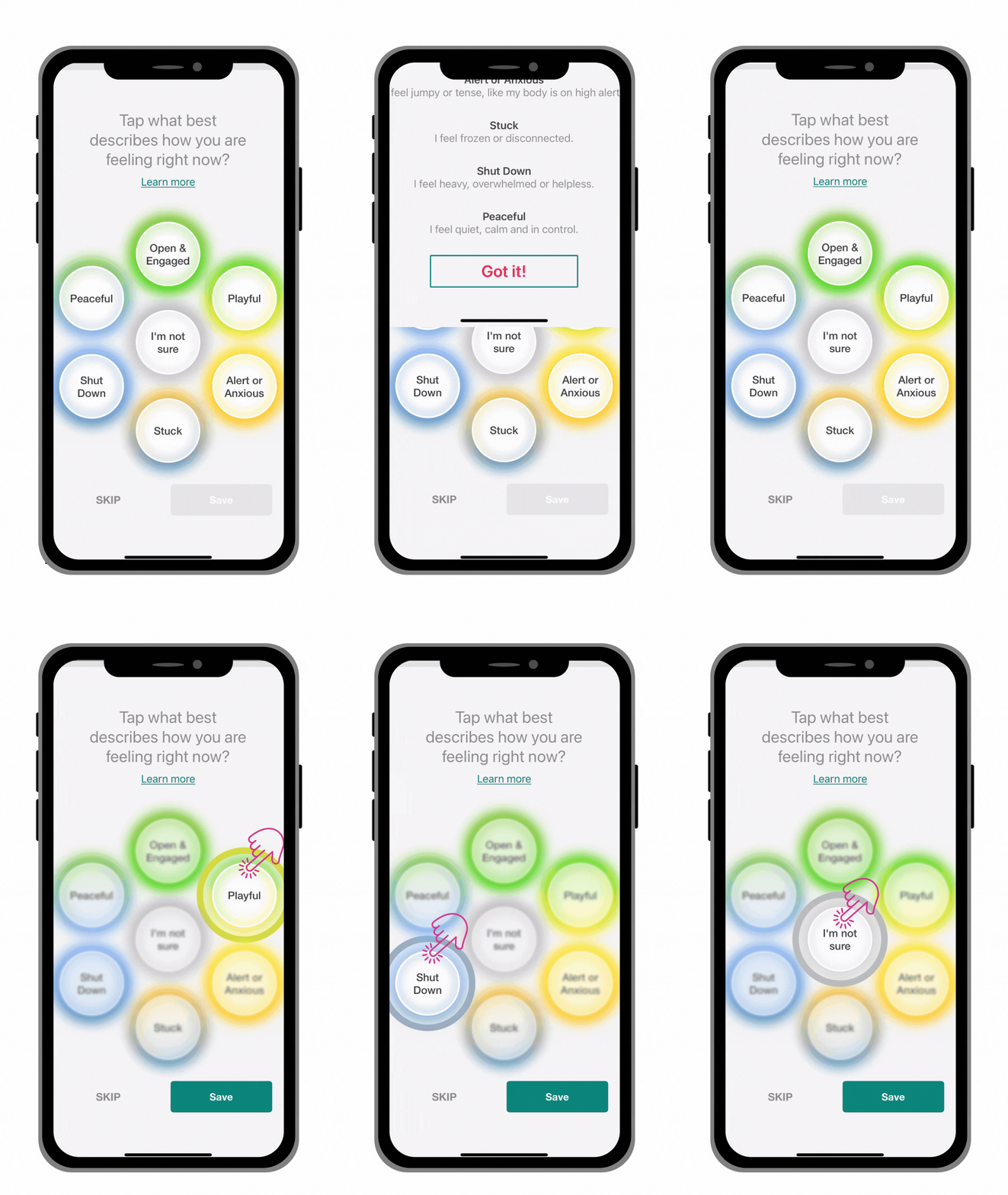
Submissions are optional and easy to use. Clients can skip the prompt or select **I'm not sure** if they prefer.
---
### **Gaining Deeper Insights**
Responses are immediately visible in Unyte Assessments. This allows you to gain a deeper understanding of your client's state right after a session and to track potential shifts in their autonomic regulation over time.
These insights can help you **titrate your delivery**—adjusting session length, co-regulation, check-ins, or the listening setting based on real-time feedback about their nervous system.
You can view your clients' responses under 'Assessments' \> choose client name \> choose State Check
Clients will not have access to the historical responses they have submitted.

---
### **Managing the Feature**
The Unyte State Check is **enabled by default** for all clients. You can turn it off for individual clients at any time in [**MyUnyte.**](https://my.unyte.com/clients) Go to **Delivery Settings** in the individual client's profile.
**Please note:** Clients will need the latest version of the Unyte Health app to access this feature: [How Do I Update the Unyte App on My Device?](https://support.unyte.com/how-do-i-update-the-unyte-app-on-my-device?hsLang=en)
- [Our Products](https://support.unyte.com/our-products?hsLang=en#main-content)
- [Safe and Sound Protocol](https://support.unyte.com/our-products?hsLang=en#safe-and-sound-protocol)
- [ILS (Focus System)](https://support.unyte.com/our-products?hsLang=en#ils-focus-system)
- [RRP](https://support.unyte.com/our-products?hsLang=en#rrp)
- [Interactive Meditation](https://support.unyte.com/our-products?hsLang=en#interactive-meditation)
- [Service Providers](https://support.unyte.com/service-providers?hsLang=en#main-content)
- [Tips and Best Practices](https://support.unyte.com/service-providers?hsLang=en#tips-and-best-practices)
- [Getting Started (Qualifications/Training)](https://support.unyte.com/service-providers?hsLang=en#getting-started-qualifications-training)
- [Resources and Benefits](https://support.unyte.com/service-providers?hsLang=en#resources-and-benefits)
- [Account & Billing](https://support.unyte.com/account-billing?hsLang=en#main-content)
- [Account Help](https://support.unyte.com/account-billing?hsLang=en#account-help)
- [Orders, Returns and Warranties](https://support.unyte.com/account-billing?hsLang=en#orders-returns-and-warranties)
- [Billing and Subscriptions](https://support.unyte.com/account-billing?hsLang=en#billing-and-subscriptions)
[](http://unyte.com)
Unyte Help Center
Copyright © 2026, Unyte Health